Wi-Fi site survey
Predictive design, AP-on-a-stick validation and post-installation surveys behind every 6 GHz plan.
Wi-Fi 6E & Wi-Fi 7 · Australia-wide
Work out what Wi-Fi 6E and Wi-Fi 7 would actually change on your site before you buy anything. We audit the devices, design the 6 GHz layer for Australian conditions, check the switching and cabling behind it, and plan a migration that keeps the operation running.
Wi-Fi 6, 6E and 7 in plain terms
The efficiency generation: OFDMA carries small packets for many devices in one transmission, BSS colouring lets an access point ignore a neighbour on the same channel, target wake time lets battery devices sleep on a schedule, and multi-user MIMO serves several clients in parallel. On 2.4 and 5 GHz, it is the generation that made dense sites work better.
The same Wi-Fi 6 technology plus the 6 GHz band — clean spectrum with room for wider channels and no legacy devices slowing everything down. Only 6E-capable clients can use it; everything else stays on 2.4 and 5 GHz.
320 MHz channels in 6 GHz, 4096-QAM for more bits per transmission at close range, and multi-link operation (MLO), which lets a device use more than one band at once or switch between them without dropping off. Real improvements — for devices that support them.
A handheld scanner sends a few hundred bytes per barcode and a screen refresh when its terminal-emulation session updates; it will never fill a 20 MHz channel, and what it needs is a clean channel, fast roaming and a battery that lasts the shift — OFDMA, BSS colouring and target wake time help it, while a 320 MHz channel and 4096-QAM do nothing for it. Voice handsets want low latency and consistent roaming, IoT and sensors want airtime efficiency, vehicle-mounted terminals want coverage at speed, and it is laptops, meeting rooms, vision systems and cameras that move real volume and gain from wider channels and 6 GHz headroom. Multi-link operation has the broadest appeal because reliability matters to every class — so the question is not "should we buy Wi-Fi 7" but which devices would use which feature, and whether access points, switching, cabling and a new survey are justified by that answer.
6 GHz in Australia
The ACMA has made the lower 6 GHz band — 5925 to 6425 MHz — available for Wi-Fi under the class licence for low-interference potential devices (LIPD), so no individual licence is needed provided the equipment complies. That is 500 MHz of clean spectrum: room for plenty of 20, 40 and 80 MHz channels, a few 160 MHz channels, and at most one 320 MHz channel. The upper part of the band has been under ACMA consideration; check its current status before planning around it rather than relying on overseas product literature.
Much of what is written about 6 GHz comes from markets with standard-power operation, where access points coordinate with a database to transmit at higher power. Australian indoor deployments are designed around the low-power indoor limits in the class licence, and low-power indoor equipment is intended for use inside buildings, so designs, datasheets and range claims that assume standard power do not transfer. The physics matter as much as the rules: higher frequencies lose more signal over distance and considerably more through walls, racking and stock, and a 5 GHz design copied across to 6 GHz leaves holes at cell edges, behind concrete and deep in pallet racking. The 6 GHz layer needs its own design and its own survey, with yards and dock aprons planned on the bands that suit them.
Client readiness
A 6 GHz network only benefits the devices that can see it. On most operational sites, the devices that matter most — rugged handhelds, vehicle-mounted terminals, label printers and voice handsets — are the ones that change slowest.
Many rugged handhelds in Australian warehouses today are Wi-Fi 5 or Wi-Fi 6 only; newer models add 6E, Wi-Fi 7 in rugged devices is still arriving, and because they are bought on a five-year cycle and often run longer, most sites will run a mixed fleet for years whatever the access points support. So the first deliverable is a fleet inventory, which tells you what share of traffic would move to 6 GHz on day one and whether an access-point refresh now is ahead of or behind the device refresh. Mixed-fleet design is normal: legacy devices stay on a well-run 5 GHz layer with its own roaming and power settings, capable devices move to 6 GHz, and the two are planned together so neither gets the leftovers. We have deployed and supported SOTI and Wavelink platforms on operational fleets for years, so the device side is not an afterthought.
Infrastructure knock-ons
Devices that cannot do WPA3 stay on a separate 2.4/5 GHz SSID, which means rethinking SSIDs, authentication and RADIUS policy and planning when the WPA2 network is retired. A modern access point can move more than one gigabit, so its uplink becomes the bottleneck; whether multi-gig ports are needed everywhere comes out of the capacity design. Tri-radio Wi-Fi 7 access points commonly draw more than 802.3at can supply and some run reduced — radios or ports switched off — when they do not get it. Existing Cat6 often carries 2.5 and 5 GbE at typical run lengths, but "often" is not a design, so we test the runs rather than assume. More capacity at the edge moves the bottleneck upstream, and new access points may need a newer controller or licence tier, with some platforms changing management model at the same time — working through all of this before ordering is what keeps an upgrade from turning into a second project.
High-roof warehouses
An omnidirectional access point mounted high in a distribution centre spends most of its energy lighting up the roof space and the next building over; down at scanner height, between full racks, what is left can be marginal, and in 6 GHz the problem gets worse. Directional and integrated-antenna models from Cisco and HPE Aruba, among others, are built for this job — mounted high, aimed down the aisles, with a pattern chosen for the rack height and aisle width — and external-antenna models give more choice where an integrated pattern does not suit. Which pattern, at which height, aimed where, is a survey question rather than a catalogue one, so we model aisle geometry and stock density per zone, allow for safe maintenance access at height, and validate the chosen model on site with AP-on-a-stick before the order, measured at device height rather than ladder height.
Private 5G or Wi-Fi
Private cellular is a real option with real strengths: very large outdoor areas such as ports, container terminals and big yards, where a few high sites cover what would take a great many access points; vehicles and machinery moving at speed, where cellular handover is designed for mobility; and situations where licensed spectrum — protection from other users on the band — is worth paying for. In Australia that spectrum means an ACMA area-wide or apparatus licence, or working through a mobile carrier that provides the private network, and each route has its own cost, lead time and obligations.
For indoor warehouses, offices, cold stores and production floors, Wi-Fi remains the right answer: almost every device you own has Wi-Fi and far fewer have a cellular radio suited to a private network, Wi-Fi is class-licensed and widely supported, and your team and providers already know how to run it. Many sites that adopt private cellular keep Wi-Fi indoors and use cellular for the yard or the fleet, so the comparison is per zone and per device class — which devices can join and what adding the rest would cost, total cost of spectrum, core, radio sites, SIM management and support against the equivalent Wi-Fi design, and who runs it when it needs attention on a Sunday night. We assess it on its merits for your site and tell you which way the numbers point.
Staged migration
Our wireless engineers are Ekahau certified, with certification current to Wi-Fi 7 (802.11be). Every step below produces something you keep, and nothing is bought until the design has been proven in your building.
Inventory every device class, its radio, security support and refresh date, which sets how much of the site will actually use 6 GHz, and when.
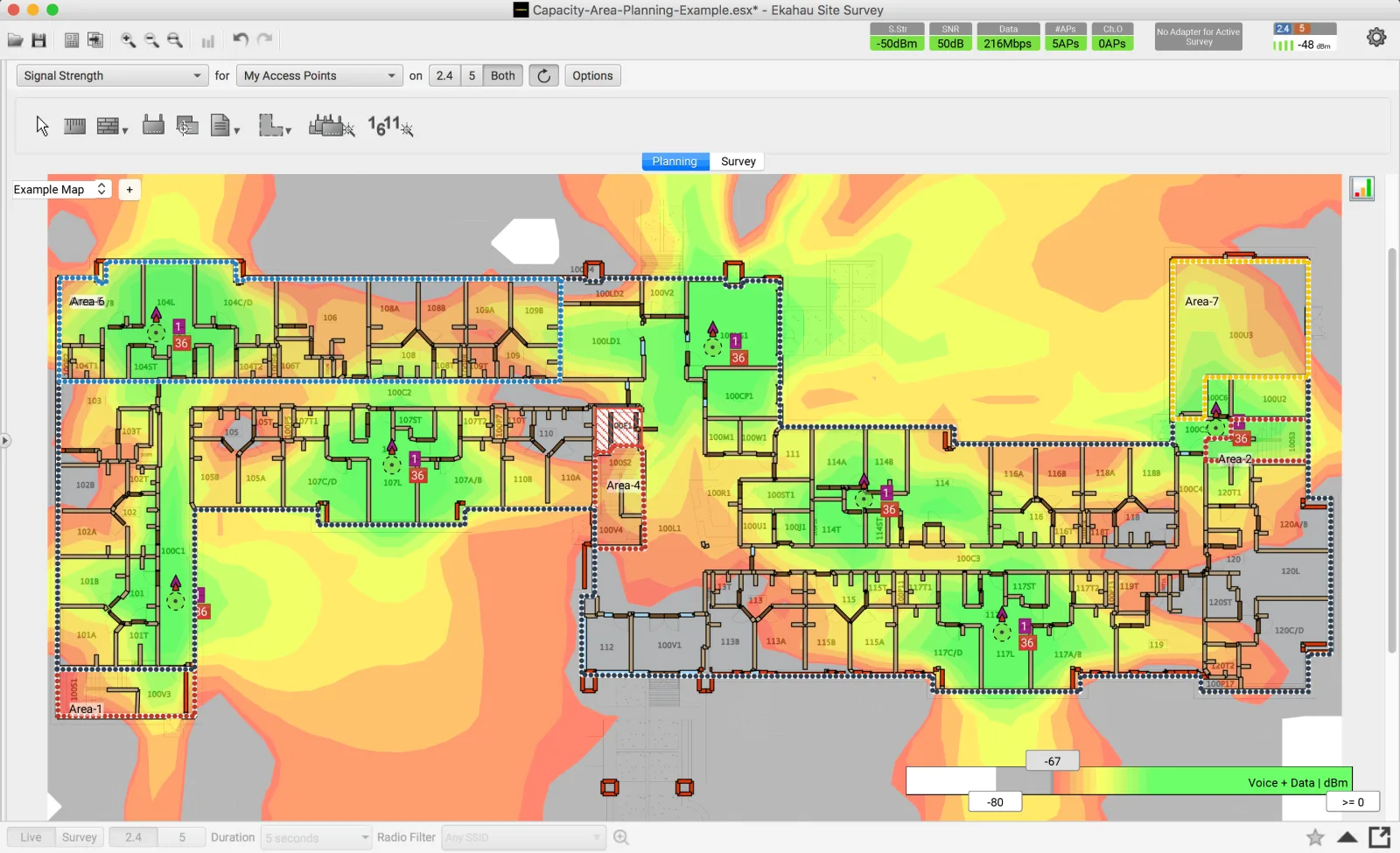
Model the 6 GHz layer alongside the existing 5 GHz layer from scaled floor plans, with materials, racking and mounting heights, under the Australian low-power indoor limits, to produce an AP count, placement, channel plan and budget.
Check every proposed location for port speed, PoE class and switch power budget, test the existing cable, and scope anything that needs upgrading before the access points arrive.
Mount the chosen model at the proposed height and location and measure the real building at the height the devices are used, adjusting the design to what we measure.
Replace access points zone by zone, outside peak periods, with legacy SSIDs kept running until the devices that need them are gone and each zone checked before the next one starts.
Walk the finished site and measure coverage, interference, roaming and capacity against the design targets, and receive the heatmaps and the unlocked Ekahau project files so the next change starts from real data.
Not sure the site is ready for any of this yet? A warehouse Wi-Fi audit measures how the current network performs and is often the right first step, and the site survey page explains the predictive, AP-on-a-stick and validation surveys in more detail.
FAQs
It depends on your devices more than your access points. If most of the fleet is Wi-Fi 5 or Wi-Fi 6 and will be for years, a Wi-Fi 7 network mostly serves the few devices that can use it. If your existing access points are due for replacement anyway, buying Wi-Fi 7-capable hardware can make sense, provided the switching, PoE and 6 GHz design are planned with it. A fleet audit answers the question for your site.
Wi-Fi 6 improved efficiency on busy networks with OFDMA, BSS colouring, target wake time and multi-user MIMO. Wi-Fi 6E is the same technology with access to the 6 GHz band. Wi-Fi 7 adds 320 MHz channels, 4096-QAM and multi-link operation, which lets a device use more than one band at once.
Yes. The ACMA has made the lower 6 GHz band, 5925 to 6425 MHz, available for Wi-Fi under the class licence, so no individual licence is needed for compliant equipment. Indoor deployments are designed around the low-power indoor limits. The status of the upper part of the band has been under ACMA consideration, so we confirm the current position when we design.
Usually not in any way an operator would notice. Scanners send small amounts of data and need clean channels, reliable roaming and good battery life far more than wide channels. Many rugged handhelds in service are Wi-Fi 5 or Wi-Fi 6 only and cannot use 6 GHz at all. Where scanners struggle today, the cause is more often design, placement or configuration, which an audit will show.
Rarely without gaps. 6 GHz loses more signal over distance and through walls, racking and stock than 5 GHz, and in Australia indoor equipment runs at low-power indoor limits. A 5 GHz layout reused for 6 GHz typically leaves holes at cell edges and deep in racking. The 6 GHz layer needs its own predictive design and on-site validation.
Often some, rarely all. Wi-Fi 7 access points commonly want multi-gig uplinks and 802.3bt PoE, so switch ports and power budgets need checking location by location. Existing Cat6 often carries 2.5 and 5 GbE at typical lengths, and we test it rather than assume. New cable runs go in as Cat6A.
They cannot join a 6 GHz network, because WPA3 is mandatory there. They stay on a separate 2.4 or 5 GHz network using WPA2 until they are replaced. We plan the SSID and authentication layout so both groups work properly, and so the older network can be retired cleanly when the last legacy devices go.
For very large outdoor areas such as ports and big yards, vehicles moving at speed, or where licensed spectrum protection matters, private cellular can be the better tool. For indoor warehouses, offices and production floors, Wi-Fi is usually the right answer, because almost every device already supports it. In Australia private 5G needs an ACMA area-wide or apparatus licence or a carrier partnership, and we assess it on its merits rather than push either way.
Related
Predictive design, AP-on-a-stick validation and post-installation surveys behind every 6 GHz plan.
Coverage, capacity, roaming and security design for mixed-fleet enterprise wireless.
Certified Cat6A runs, multi-gig switch ports and PoE budgets ready for the new access points.
Tell us what you are planning — a new site, a network that keeps dropping out, or IT that needs a safer pair of hands. We will come back with straight answers and a clear quote.